


Most roofing shops don't decide to build a messy tech stack. It just happens. You start with a CRM because sales needs one. Then a measurement tool because the estimators wanted it. Then a project management app because two crews turned into six and the whiteboard stopped working. Somewhere along the way, a supplement platform, a photo app, an accounting system, and a scheduling tool all get bolted on. None of them were designed to talk to each other, and nobody wrote down how they're supposed to.
Fine at three jobs a week. Quietly becomes a nightmare at thirty.
Every one of those tools stores a slightly different version of the same job. The CRM calls it "Opportunity #4471." Production calls it "Miller reroof." Accounting calls it "INV-2231." The measurement report is filed under the homeowner's last name spelled two different ways. When those systems drift, the job doesn't fall apart in one dramatic moment — it leaks. A supplement gets missed. A crew shows up a day early. An invoice sits for three weeks because nobody can match it to the completed work.
This article is about the boring layer underneath all of that: field data governance for roofing integrations, and specifically the data contracts that keep your systems honest. Not the software you buy, but the rules for how your software agrees on what's true.
Why integrations quietly break (and it's rarely the software's fault)
When people say "our tools don't integrate," what they usually mean is "our tools integrate, but the data going between them is garbage." Those are very different problems.
The pattern repeats constantly. Two systems get connected with a Zapier automation or a native integration. Works great in the demo because someone typed clean data into both sides. Then real life happens. A rep leaves the phone number blank. An estimator types "TBD" into the roof squares field. A foreman uploads photos but skips the job number. The integration doesn't crash — it just faithfully passes broken data downstream, and now three systems are wrong instead of one.
The root cause is that nobody defined what a valid record actually looks like. There's no agreement on which fields are required, who owns them, or what format they come in. That agreement is what a data contract is. Not a legal document — a plain statement of: when System A sends a job to System B, here's exactly what must be included, in what format, and who's responsible if it's missing.
Without that, every integration is a handshake between two people who don't speak the same language and are both nodding politely.
What actually belongs in a roofing data contract
A data contract doesn't need to be complicated. For a small or mid-size roofing operation, it comes down to four things per record: required fields, formats, ownership, and timestamps. Get those right and most integration pain disappears.
Keep every roofing job on track and on time.
Roofyly helps you manage, schedule, and communicate every roofing project with precision and ease.
- Centralized project planning
- Real-time crew notifications
- Integrated scheduling & client updates
No credit card required
Here's what a real job record contract might look like as it moves from sales to production:
| Field | Required? | Format | Owner | When it's set |
|---|---|---|---|---|
job_id | Yes | System-generated, never manual | CRM | At opportunity creation |
homeowner_name | Yes | Last, First | Sales rep | At intake |
service_address | Yes | Validated street address + ZIP | Sales rep | At intake |
roof_squares | Yes | Number, one decimal | Estimator | After measurement QA |
pitch | Yes | X/12 format | Estimator | After measurement QA |
contractsigneddate | Yes | ISO date (YYYY-MM-DD) | Sales rep | At close |
scheduledinstalldate | Yes | ISO date | Production coordinator | At scheduling |
crew_assigned | Yes | Crew ID from list | Production coordinator | At scheduling |
permit_status | Conditional | Enum: none/applied/approved | Permit clerk | Before install |
photosetcomplete | Yes | Boolean | Foreman | At job completion |
Two things matter more than the specific fields.
First, job_id is sacred. System-generated, never changed. It's the thread that ties the measurement report, the photos, the supplement, the invoice, and the warranty record back to one job. The single most common cause of integration chaos is shops that let humans type or edit the identifier. The moment someone renames a job, every downstream link silently breaks.
Second, every field has exactly one owner. Not "sales and production both update the install date." One owner. If two roles can write to the same field, they will overwrite each other, and you'll spend Monday mornings figuring out whose version was right. This same discipline is what makes field data governance and photo retention actually work — a photo without a clear owner and a clean job ID is just a file nobody can defend later.
Make
job_idsystem-generated and immutable.
The format details that cause most of the pain
Dates are the worst offender. If your CRM stores 03/04/25 and your accounting system reads it as 04/03/25, you now have jobs scheduled in the wrong month and nobody notices until a crew is idle. Pick ISO format (YYYY-MM-DD) everywhere and enforce it at the source. It's ugly to look at and it will save you real money.
Phone numbers, ZIP codes, and enums — dropdown values like "shingle / metal / tile" — are the next tier. Free-text fields where a dropdown belongs are where data goes to die. If a foreman can type the material type by hand, you'll eventually end up with "arch shingle," "architectural," "arch.", and "asphalt arch" all meaning the same thing, and none of them matching your material ordering rules.
API and CSV patterns for the tools you're actually using
Not every tool has a clean API, and you don't need one for every connection. You need the right pattern for each situation. Here's how the common roofing tool categories usually behave.
Measurement tools. These almost always export clean PDFs and often a structured data file. The pattern that works: pull squares, pitch, and facet data as structured fields — not as a PDF you re-key by hand. If the tool only gives you a PDF, that's a governance gap. Someone typing squares off a report into your estimating system is a re-entry point where errors get born. Even a simple CSV export mapped to your roof_squares and pitch fields removes that risk.
CRMs. Most modern roofing CRMs have real APIs and webhooks. Use webhooks to push, not polling to pull, when you can. A webhook fires the instant a contract is signed and hands the job downstream with the required fields attached. If you're stuck with a weaker CRM, a scheduled CSV export every few hours is a fine fallback — just make sure the export includes job_id and rejects rows missing required fields.
Accounting systems. Usually the strictest and least forgiving, which is actually good. Treat accounting as a downstream consumer that should reject bad records rather than accept them quietly. If a completed job can't produce a clean invoice line because roof_squares is blank, you want that to fail loudly at the handoff — not three weeks later during collections.
Photo and field-capture apps. This is where offline reality bites. Crews work in places with no signal, and photos captured offline need to sync back with the job ID intact. If your capture tool can't tag a photo to a job_id before it has connectivity, you'll get orphaned image sets. This connects directly to the sync discipline covered in mobile offline capture and sync rules — the data contract has to survive a dead zone, not just a clean office network.
-
Real-time matters and both tools have APIs → use webhooks/API push.
-
Real-time matters but one tool is weak → API on the strong side, scheduled export on the weak side.
-
Real-time doesn't matter (daily sync is fine) → scheduled CSV export/import with validation.
-
No API and no export → this tool is a governance liability; plan to replace it.
The mistake shops make is trying to make everything real-time. You don't need your material yield data syncing every 90 seconds. A nightly batch works for most things. Save the real-time connections for handoffs where a delay actually costs you a crew day or a missed supplement window.
What breaks specifically at scale
At one crew, you are the integration. Every job is in your head, so when a field is blank you fill it in from memory. This is why small shops genuinely don't feel the problem — and why they get blindsided when they grow.
-
The person who knew everything stops knowing everything. Institutional memory was your integration layer. Once you hire a second coordinator, the gaps in your data contract become real gaps in operations.
-
Handoffs multiply faster than headcount. Two crews isn't twice the coordination — it's the number of handoffs between sales, estimating, scheduling, supply, and production, squared. Every weak field becomes a recurring failure instead of a one-off.
-
Blame becomes untraceable. Without timestamps and ownership on fields, you can't tell whether the wrong install date came from the rep, the coordinator, or a bad sync. You just know the crew was idle. Timestamped, owned records turn "who screwed up" from an argument into a lookup.
Reporting gets untrustworthy. When the same job exists in three slightly different states across systems, your production numbers stop matching your invoiced numbers, which stop matching your CRM pipeline. Leadership loses faith in the dashboards and goes back to gut feel — which is exactly what you were trying to escape by buying software in the first place. Clean contracts are what make a rules-based metrics framework usable instead of decorative.
A real scenario: the invoice-matching leak
A mid-size residential roofer running about five crews had a persistent problem: somewhere around 15–20% of completed jobs took over 30 days to invoice. Not because of disputes — because production and accounting couldn't reliably match a completed job to its contract.
The cause turned out to be small and stupid, the way these things usually are. Production was creating job records manually with names like "Henderson – Elm St," while accounting keyed invoices against contract numbers from the CRM. No shared job_id linking the two, so an admin was matching them by hand every week. Anything ambiguous fell to the bottom of the pile.
The fix wasn't new software. It was a data contract. They made the CRM the single source of the job_id, forced production and accounting to both reference it, and rejected any completed-job record that didn't carry it. Nothing fancy.
Within about two months, the over-30-day invoice group dropped to under 5%. The weekly hand-matching job — a few hours of admin time — mostly disappeared. On roughly $3M–$4M in annual volume, pulling that cash forward by even a few weeks was worth more than any tool they'd bought that year.
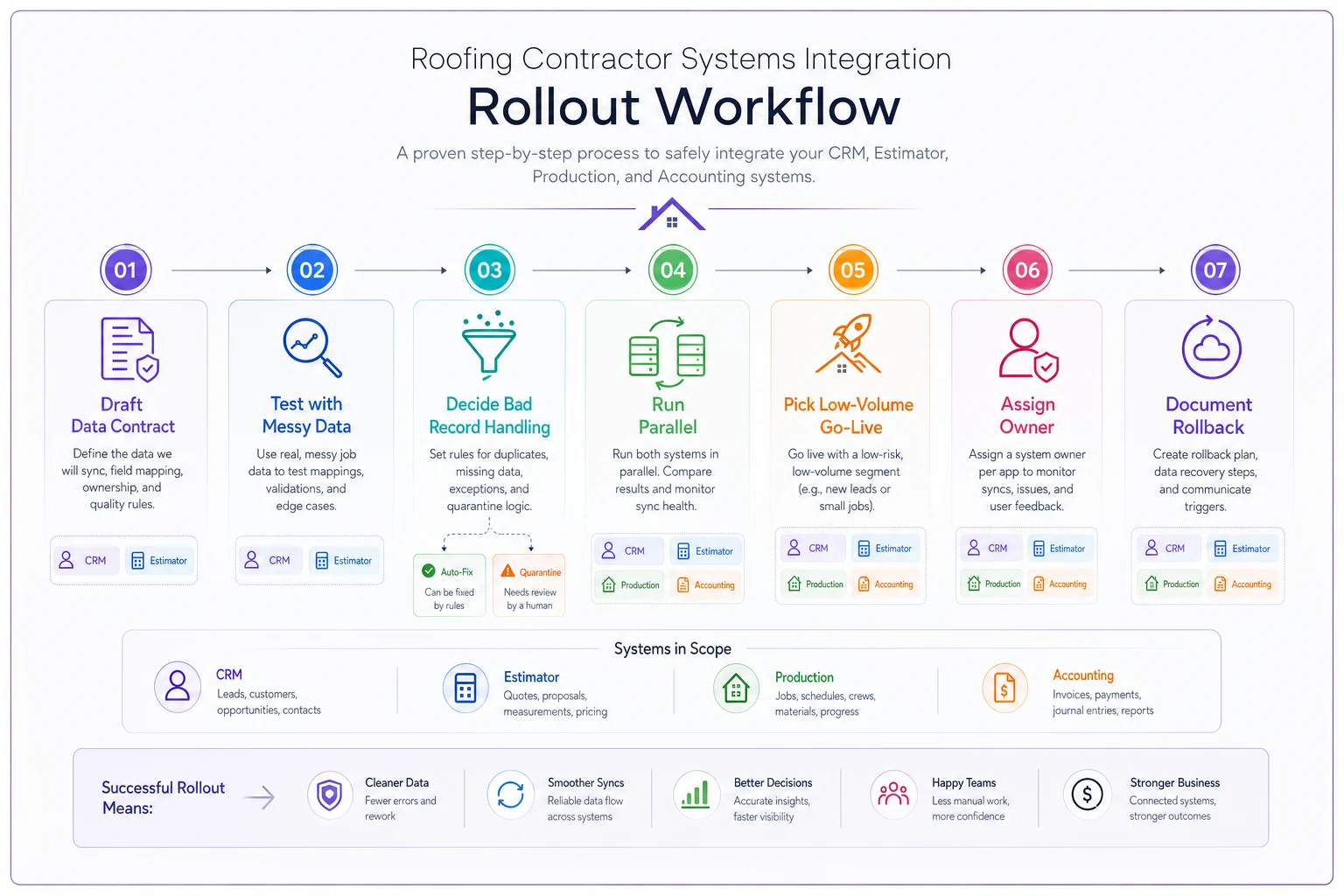
Rollout checklist: adding or changing an integration
The riskiest moment in your tech stack is the day you connect two systems. Here's a lightweight sequence that keeps a rollout from taking down live jobs:
-
[ ] Write the data contract first. Required fields, formats, owner, and timestamp for every field crossing the connection. One page is enough.
-
[ ] Test with real messy data, not clean demo data. Feed it blank fields, misspelled names, and a "TBD" square count on purpose. See what breaks.
-
[ ] Decide what happens to bad records — reject, flag, or quarantine. Never "pass silently."
-
[ ] Run parallel for one to two weeks. Keep the old process alive while the new integration runs alongside it. Compare outputs daily.
-
[ ] Pick a low-volume window to go live — not the Monday after a storm.
-
[ ] Assign one owner to watch the connection for the first two weeks. Someone whose job it is to catch drift early.
-
[ ] Document how to turn it off. If you can't explain the rollback in two sentences, you're not ready.
A simple visual of that rollout sequence:
Rollback plan (write this before you need it)
-
Trigger What signals you pull the plug? (e.g., more than X bad records per day, or any data corruption in accounting.)
-
Switch How do you actually disable the connection? Who has access?
-
Cleanup How do you find and fix records that synced badly during the failure window?
-
Fallback What manual process covers the gap until it's fixed?
The shops that recover fast from a bad integration aren't smarter — they just wrote step 2 down before launch instead of scrambling for it at 6 a.m.
A lightweight tech-steering template for small/mid shops
You don't need an IT department or a formal committee. You need a small, recurring decision that keeps tools from multiplying out of control. Most operations this size run this as a 30-minute monthly conversation between the owner, ops lead, and whoever handles admin.
1. What tool changes are people asking for? Every new tool request gets a one-line answer to: what data contract does this touch, and who owns the fields? If nobody can answer, it's not ready to buy.
2. Where is data drifting? Pick one integration each month and audit ten random records end to end. Do the squares in the estimate match the invoice? Do the photos carry the job ID? Drift is invisible until you go looking.
3. What's the one governance fix this month? Not ten. One. Enforce ISO dates. Or make material type a dropdown. Small, enforced, done.
4. What can we retire? The healthiest thing a growing shop can do is kill tools. Every app you drop is one fewer integration to govern. Overlapping tools are where data goes to contradict itself.
When this level of governance makes sense — and when it doesn't
Do this if you're running three or more crews, you've got separate people in sales, estimating, and production, or you've ever had an invoice sit for weeks because nobody could match it to a job. The coordination cost is already there; you're just paying it in chaos instead of process.
Skip the heavy version if you're a one- or two-crew shop where the owner still touches every job. You still want a consistent job_id and clean dates, but a formal steering rhythm is overkill. Don't build governance for a scale you don't have yet.
Be careful if you're mid-transition — growing fast, adding tools monthly. This is the danger zone. It's tempting to keep bolting on software and deal with the mess later. "Later" is when you have twelve crews and no idea which system is telling the truth.
The mindset shift that actually matters
The instinct in a growing roofing business is to fix coordination problems by buying another tool. More often, the problem isn't a missing tool — it's that the tools you already own don't agree on what a job is.
Data contracts are unglamorous. Nobody gets excited about deciding that install dates are ISO-formatted and owned by the production coordinator. But that boring agreement is what lets a crew, an estimator, an office admin, and an accounting system all work off the same reality without a human standing in the middle re-keying and reconciling. As you scale, that human-in-the-middle is the first thing to break and the most expensive thing to replace.
Get the contracts right, connect the tools deliberately, and keep a small monthly rhythm to catch drift. Do that, and your stack quietly stops leaking — which, in a five-crew shop, is worth more than most of the flashy features you'll ever be sold.
Ready to elevate your roofing operations?
Join hundreds of roofing contractors using Roofyly to streamline workflows, improve crew coordination, and enhance client satisfaction.