


The job was going smooth until it wasn't. Your crew's been documenting everything on that Walnut Creek reroof — every layer of deteriorated decking, every compromised rafter tail, every bit of water damage hiding under the old shingles. The foreman's phone has 47 photos showing exactly why you need that $8,400 change order approved. Then his phone dies at 3 PM. No biggie, he'll charge it in the truck and upload everything tonight.
Except when he plugs it in, the phone won't turn on. Water damage from that morning's unexpected rain. All 47 photos? Gone. The insurance adjuster shows up tomorrow expecting documentation. Your change order is dead. This happens more than roofing contractors want to admit. Not because crews are careless, but because offline data capture on roofing jobsites is genuinely harder than it looks. You're dealing with spotty cell towers, dying batteries, full phone storage, and crews who have better things to worry about than whether their photos made it to the cloud.
The brutal reality of mobile data on roofing jobsites
Most roofing crews operate in a dead zone for at least part of their workday. Rural jobs obviously have coverage issues, but even suburban sites catch you off guard — metal roofs block signals, tall trees kill towers, and that perfect staging corner is somehow always the one spot where nobody gets service.
So crews adapt by working offline. They snap photos, fill out inspection forms, mark scope changes, all assuming it'll sync later. The phone becomes a temporary vault. Which works fine until:
-
The phone breaks (drops happen, water happens, heat happens)
-
Storage fills mid-job and photos start failing silently
-
The app crashes and corrupts its local database
-
Someone factory resets without thinking
-
The crew lead quits and their personal phone walks out with your documentation
Each failure mode hits you differently. Lost damage photos mean fighting adjusters without evidence. Missing progress shots mean re-inspections and delays. Vanished safety incident reports mean liability exposure. When that data disappears three days into a complex commercial reroof, you're not just losing photos — you're losing your ability to defend the work and get paid for changes.
Understanding what actually protects field data
Minimal metadata capture Every photo needs three pieces of metadata burned directly into it: timestamp, GPS coordinates, and job number. Not fancy EXIF data that gets stripped during file transfers — visible overlays on the actual image. Your foreman's blurry photo of rotted decking becomes defensible evidence when it shows "03/14/24 2:47PM | 1847 Oak Ridge Dr | Job #8924" right on the image.
Keep every roofing job on track and on time.
Roofyly helps you manage, schedule, and communicate every roofing project with precision and ease.
- Centralized project planning
- Real-time crew notifications
- Integrated scheduling & client updates
No credit card required
Smart teams configure their capture apps to add this automatically. The metadata lives in the pixel data, not a database that might corrupt. Even if the photo gets texted, emailed, or screenshot, the critical context travels with it.
Local caching with defensive copies Your phone should never be the only copy of critical jobsite data. The pattern that works: capture locally, create immediate backup copies, sync when possible. Operationally, it looks like this. Foreman takes a photo of concealed damage. The app immediately:
-
Saves the full-resolution original to the phone's camera roll
-
Creates a compressed copy in the app's secure storage
-
Queues both for cloud sync when connection returns
-
Writes a local backup file with photo reference and metadata
This feels excessive until you've lost documentation once. Now you have three local copies plus eventual cloud backup. App corrupts? Camera roll survives. Phone dies? Secure storage might still be recoverable.
Retry policies that actually work Most apps try to sync once and give up. That's useless on a jobsite where connection comes and goes every hour. You need graduated retry logic:
-
First failure
retry in 30 seconds
-
Second failure
retry in 2 minutes
-
Third failure
retry in 10 minutes
-
Fourth+ failures
retry every hour until successful
The critical part is handling partial uploads. If you're syncing 47 photos and the connection drops after photo 23, the app needs to remember which ones went through. Nothing worse than re-uploading the same batch repeatedly while the remaining photos never actually sync.
The retry queue should also respect battery and data. Don't burn through crew members' data plans retrying huge video files. Don't drain the battery when you're clearly offline. Sync on WiFi when available, prioritize smaller files on cellular, pause below 20% battery.
Field-tested rules for preserving documentation
The 4-hour sync rule Every device should attempt a full sync at minimum every 4 hours. Not end-of-day syncing — that's how you lose everything when phones die at 4 PM. Set reminders if needed: morning huddle, lunch, before heading home.
During storm season or heavy insurance work, cut this to 2-hour intervals. The extra battery drain is worth it.
Crew lead should show uploaded photos to the foreman before trucks roll.
Job-close forced upload Before any crew leaves a jobsite, someone verifies successful upload of that day's documentation. Not "yeah I hit sync" — actually opening the cloud interface to confirm photos are there. This takes 2 minutes and saves massive headaches when you need evidence later.
Make it physical. Crew lead shows the uploaded photos to the foreman before trucks roll. On multi-day jobs, assign one person to verify uploads each evening across every device that captured anything that day.
The backup photographer rule Never rely on a single device for critical documentation. For insurance claims, warranty issues, or discovered damage, two phones should capture the same evidence from slightly different angles.
This redundancy saved a Denver contractor around $43,000. The lead's phone corrupted all photos from a hail damage assessment. But the apprentice had been taking his own photos to study damage patterns. Those secondary shots proved extensive damage to the carrier, getting full approval for a complete reroof instead of the patch job initially authorized.
Storage monitoring and cleanup Phones fail to capture when storage fills up, but most crews don't catch it until they're trying to document critical damage. Make Monday morning storage checks a habit — every crew member checks available storage. Under 2GB free? Time to offload photos or clear out old junk.
Some operations go further with dedicated capture devices — older phones with no personal apps, used only for jobsite documentation. These stay clean, have predictable storage, and don't disappear when employees leave.
Common failure modes that kill documentation
The delayed sync disaster Crew documents everything perfectly Tuesday. No cell coverage at the rural site, they forget to sync that night. Wednesday morning, the foreman's truck gets broken into. Phone stolen, along with all of Tuesday's documentation showing why you need that structural repair authorized.
Fix: geofenced sync reminders. When the device detects it's left the jobsite area, it prompts for sync. Most crews drive past cell coverage on the way home anyway — that's your window.
The app update corruption Saturday night, the app auto-updates. Monday morning, your crew opens it to find cached photos from last week are gone. The update process cleared the local cache without syncing first.
You protect against this by never trusting a single app with your only copy. Photos should also exist in the camera roll, and critical ones should be texted or emailed as an extra backup. Yes, it's redundant. That redundancy is exactly what saves you when apps fail.
The personal phone problem Your best crew lead uses their personal phone for everything. They document beautifully, never miss a detail. Then they get a better offer from another contractor and leave — taking two weeks of unsynced documentation with them.
It's usually not malicious. They probably don't realize what's on there. But now you're missing documentation for three active insurance claims. The fix is company devices for documentation, or at minimum, daily forced syncs from personal devices.
Building sync monitoring into operations
Morning sync check During the morning huddle, someone opens the cloud interface and verifies yesterday's uploads. Takes 30 seconds. "Okay, I've got Tom's photos from Anderson, Maria's from Elm Street, and... nothing from Williams? Steve, check your phone."
That immediate feedback loop catches sync failures while you can still fix them. Steve's phone might still have the photos cached, just waiting for someone to notice they didn't upload.
The sync dashboard Whether it's a spreadsheet or something more automated, track sync status by crew and job:
| Date | Job | Crew Lead | Photos Expected | Photos Synced | Status |
|---|---|---|---|---|---|
| 3/14 | Anderson Reroof | Tom | ~20 | 23 | ✓ |
| 3/14 | Elm Street Repair | Maria | ~10 | 12 | ✓ |
| 3/14 | Williams Residence | Steve | ~15 | 0 | MISSING |
| 3/15 | Oak Ridge Commercial | Tom | ~30 | 28 | Partial |
This visibility reveals patterns over time. Maybe Steve's phone consistently fails to sync — time for a new device. Maybe Oak Ridge has persistent connectivity problems — bring a hotspot. Without tracking, these patterns stay invisible until something critical goes missing.
End-of-week documentation audit Every Friday, someone reviews documentation completeness for the week. Not just "did photos sync" but "do we have complete documentation for every significant discovery or decision?" Missing photos of unexpected chimney damage? Still time to go back. Forgot to document the neighbor's property before starting? Better to catch it now than during a damage dispute three months later.
Specific UX rules that preserve evidence
Capture confirmation Every photo capture should give immediate visual and tactile feedback. Phone vibrates, screen flashes, thumbnail appears. Sounds basic, but plenty of apps fail silently when storage is full or the camera crashes.
Progressive JPG compression When uploading over spotty cellular, use progressive compression. Push a low-resolution version first to get the evidence secured, then upgrade to full resolution when bandwidth allows. Even if sync fails halfway through, you have something rather than nothing.
Visible sync status Crews need sync status visible without digging through menus. A simple icon system on photo thumbnails works:
-
Gray cloud
not yet attempted
-
Amber cloud with arrows
syncing now
-
Red cloud
sync failed, will retry
-
Green checkmark
successfully synced
Your foreman can glance at their gallery and immediately see which photos are safe versus still at risk.
Failure notifications that matter Don't bury sync failures in a tiny notification. Make it hard to miss when opening the app: "17 photos from yesterday haven't synced. Connect to WiFi or cell signal to preserve documentation." Better yet, make it actionable: "17 photos haven't synced. Tap here to email them as backup." Even if cloud sync keeps failing, at least copies are sitting in someone's sent folder.
Creating cache-and-forward workflows
The documentation sandwich Cache your inputs locally at the start of each work segment. Do the work while documenting offline. Verify outputs synced before leaving.
Morning: Download work orders, permits, and customer notes while still on shop WiFi. Workday: Capture everything offline with no dependency on connectivity. Evening: Upload all documentation once back in cell range.
Staged capture with priority flags Not all documentation carries equal weight. Teach crews to flag priority items that must sync first:
-
Insurance claim evidence
CRITICAL
-
Safety incidents
CRITICAL
-
Progress photos
STANDARD
-
Material delivery confirmations
LOW
When connection is limited, critical items upload first. The damaged decking photo gets through before the routine progress shot — preserving documentation that directly impacts payment and liability.
Local preview before sync Before photos leave the device, crews should review what they're about to upload. A simple gallery view of the day's captures lets them verify they got everything. Missing the photo of that damaged valley? Still time to grab it before leaving. This also catches personal photos before they upload to company servers, which nobody wants showing up in project documentation.
A quick visual of the cache-and-forward workflow can help teams adopt the pattern.
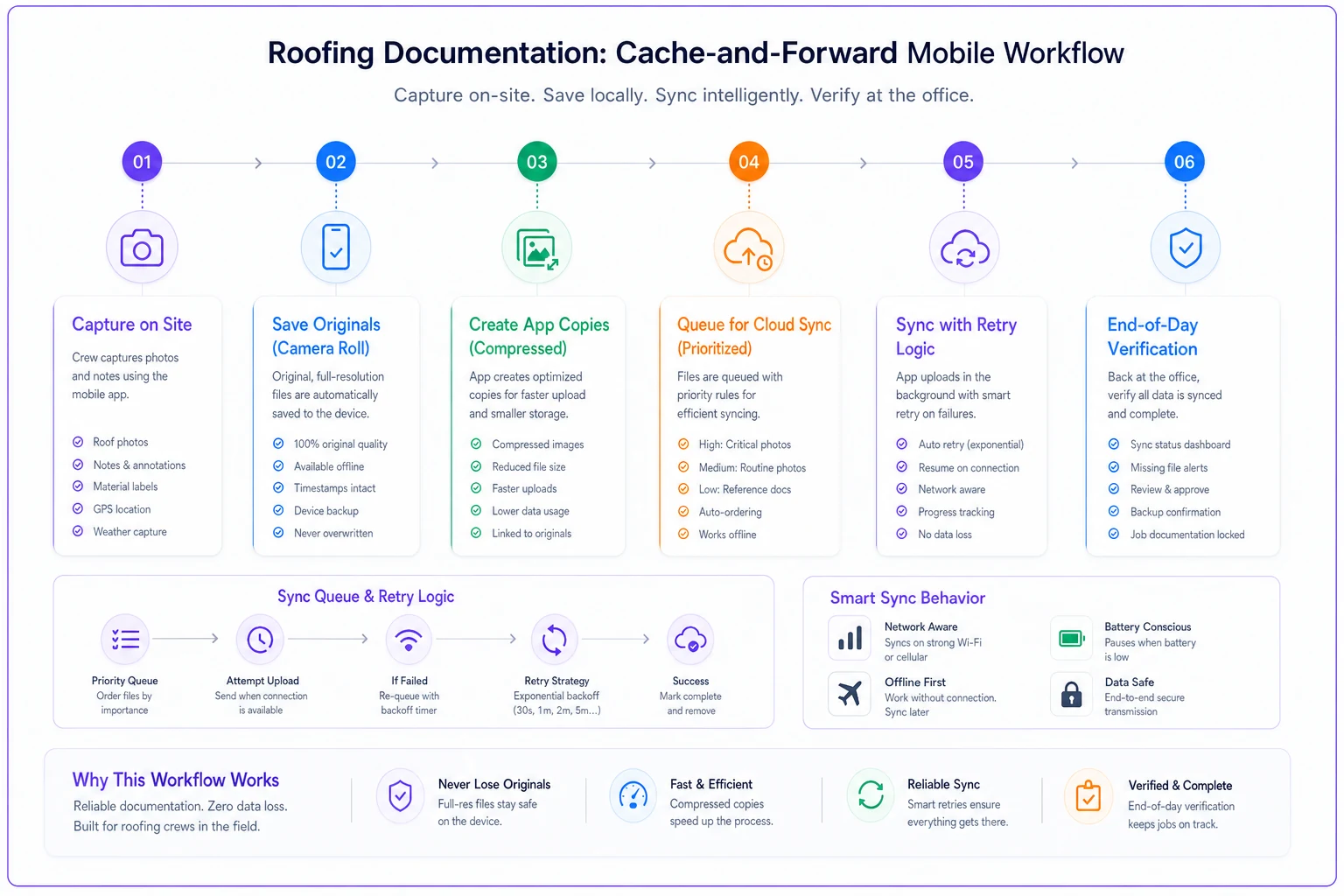
Use this visual when training crews: capture, local backups, prioritized sync, and end-of-day verification.
Why evidence preservation matters for payment
Every roofing contractor has a story about lost documentation costing them money. The patterns are depressingly familiar: crew finds hidden damage, documents it, something fails in sync, and now you're eating $5k in repairs because you can't prove they were necessary.
But the real cost goes beyond individual change orders. Insurance companies track documentation reliability. Adjusters remember which contractors always have their photos ready versus those who scramble. That reputation directly affects how fast claims get approved and how much pushback you face on supplements.
One Sacramento contractor ran into this over about six months. Three lost documentation incidents flagged them as unreliable with a major carrier. Every subsequent claim faced extra scrutiny. Supplements that used to get approved in days started taking weeks. They estimated it cost them close to $200k in delayed payments and denied claims that year.
Contractors with bulletproof documentation processes get scopes approved faster, face fewer rejections on supplements, and build reputations as reliable partners with adjusters. That reputation translates directly to cash flow.
AI-powered operational platforms for documentation workflows
Modern operational software handles the offline data capture challenge by managing complexity in the background. Instead of crews manually juggling sync queues, AI-assisted platforms monitor capture patterns and keep documentation flowing from field to office without anyone having to babysit the process.
These platforms build defensive architecture in from the start. Every photo gets redundant local storage, automatic metadata, and intelligent sync scheduling. When connection drops, the system queues documentation and manages retries based on priority and available bandwidth. Crews just capture what they need.
Where this gets genuinely useful is automated verification. The platform learns what complete documentation looks like for different job types. Missing progress photos for day two of a reroof? It prompts the crew before they leave the site. Unusual gap in documentation during tear-off? Flagged for review, potentially catching unreported damage or skipped inspection steps.
For contractors juggling multiple crews across scattered jobsites, this kind of automation turns documentation from a constant worry into a background process that mostly just works.
Moving forward with confidence
Lost documentation doesn't have to be an expected cost of doing business. Contractors who've built systematic approaches to capturing and preserving field evidence stop losing money to it.
It starts with accepting that your phone is a capture device, not a storage device. Every photo, form, and note needs multiple backup paths to survive the realities of construction work. Then you build workflows that assume things will fail and create enough redundancy that critical evidence survives anyway.
Your crews are already taking the photos. Already filling out forms. Already documenting the work. The difference between losing that documentation and keeping it comes down to the systems built around offline data capture. Get those patterns right, and you'll stop having to explain to adjusters why you don't have photos of that damaged decking.
Ready to elevate your roofing operations?
Join hundreds of roofing contractors using Roofyly to streamline workflows, improve crew coordination, and enhance client satisfaction.