

Most roofing contractors buy software twice. The first time, they pick something because a competitor mentioned it at a trade show, or a sales rep caught them during a slow week. Eighteen months later, half the crew refuses to use it, estimating still happens in a spreadsheet, and invoices still go out five days late. Then they buy again — this time knowing what questions to ask.
This guide is meant to get you to that second purchase on the first try. It's long, but roofing software is a multi-year decision that touches estimating, cash flow, scheduling, and compliance all at once. Getting it wrong is expensive in ways that don't show up until you're mid-season and locked in.
Start with the part you can actually print and bring to a demo.
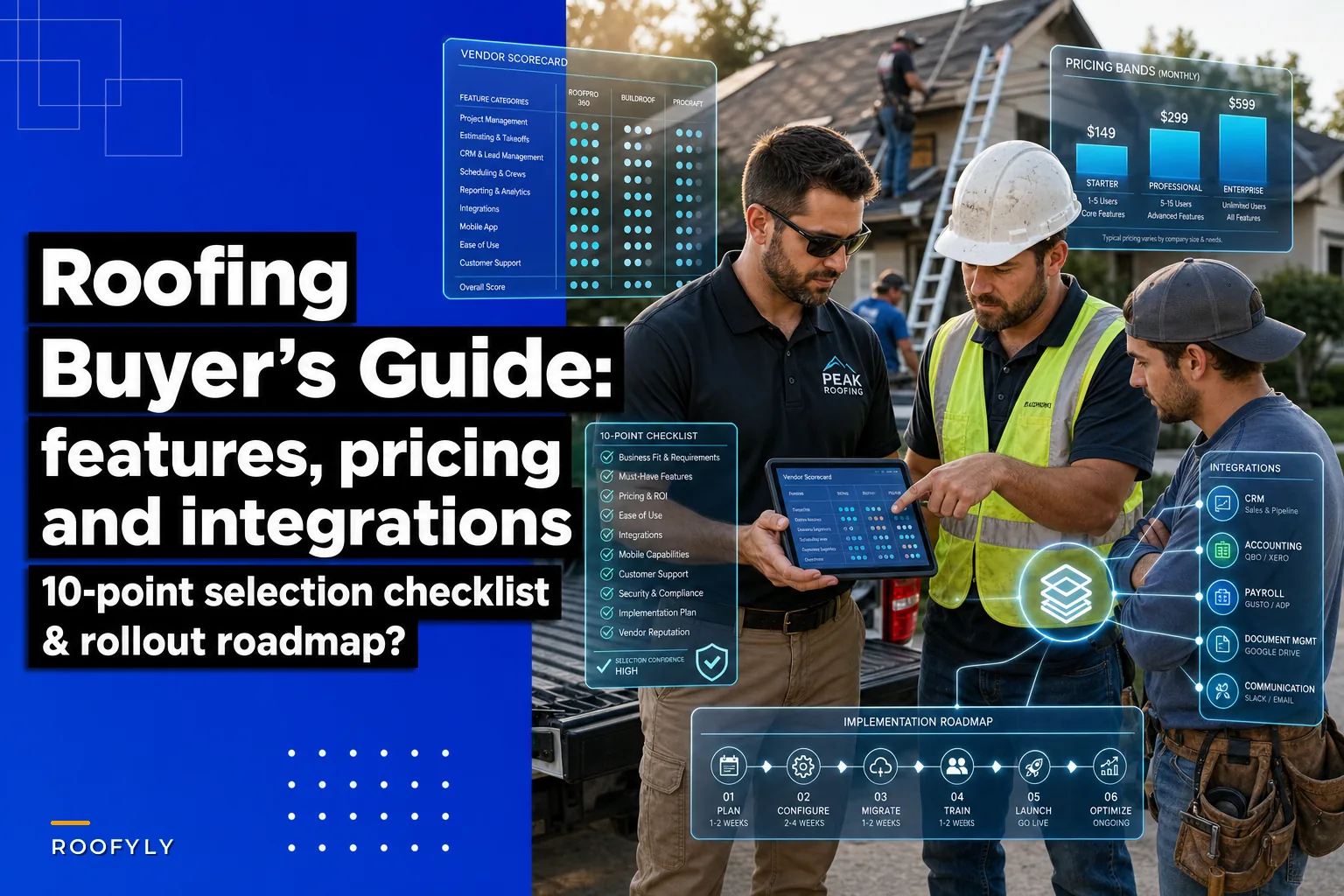
The One-Page 10-Point Selection Checklist
Print this. Tape it next to your monitor during vendor demos. Every point ties back to a goal you already care about — not a feature the vendor wants to show off.
1. Estimating accuracy. Can it pull measurements, apply your real labor allowances, and produce a number you'd stake a job on? If the estimate still needs manual correction every time, it's not solving the problem.
2. Speed from signed contract to first invoice. Ask the vendor to walk through, click by click, how a signed job becomes an invoice. Count the clicks. If it's more than a dozen, your billing will stay slow.
3. Crew scheduling and dispatch. Can a dispatcher move three crews around a weather delay in under ten minutes? Watch them do it live.
4. Mobile field workflow that works offline. Roofs are on job sites with bad signal. If photos and forms don't sync reliably when the phone reconnects, field adoption dies.
5. Materials and inventory visibility. Does it connect what you ordered to what the job actually used? Waste hides in that gap.
6. Accounting integration, not accounting export. "Exports to QuickBooks" and "syncs with QuickBooks" are very different promises. Make them show you a real two-way sync.
7. Reporting you'll actually open. Can you see job-level profit without a spreadsheet? If the reports are pretty but useless, they won't change a single decision.
8. Compliance and safety documentation. Permits, inspections, safety checklists, warranty records — can the system hold them and surface them when an adjuster or inspector asks?
9. Real onboarding, with a human. Ask who does your data migration and training. "Watch these videos" is not onboarding.
10. Total cost at your crew count in 18 months. Price it for where you'll be, not where you are. Per-user pricing that's fine for 4 users can sting at 14.
If a platform scores poorly on three or more of these, keep looking. Roofing software that nails estimating but can't schedule crews will frustrate you every single day.
Feature Deep-Dive: What Actually Matters in Each Module
Vendors sell features. You're buying outcomes. Here's how to read each module during a demo so you're evaluating what matters, not what's on the slide.
Keep every roofing job on track and on time.
Roofyly helps you manage, schedule, and communicate every roofing project with precision and ease.
- Centralized project planning
- Real-time crew notifications
- Integrated scheduling & client updates
No credit card required
Estimating & Proposals
This is where most roofing software either earns its keep or quietly fails. A good estimating module lets you build assemblies — tear-off, underlayment, shingles, flashing, labor — and price them from your own cost data, not some generic national average.
What separates serious tools from the rest: whether your labor allowances for pitch, penetrations, and crew size are baked in, or whether the estimator has to remember to adjust manually every time. Manual adjustment is how two estimators produce two different numbers for the same roof.
The proposal side matters more than people expect. A clean, option-based proposal — good/better/best shingle tiers — closes better than a single lump-sum number. Ask whether homeowners can e-sign and whether that signature triggers the next step automatically.
Common mistake: buying estimating software that produces a beautiful proposal but stores none of the underlying cost breakdown. When margins slip, you'll want to trace why, and you can't do that if the system only kept the final price.
CRM & Lead Tracking
Roofing leads come from storms, referrals, canvassing, and insurance work — and they age fast. A storm lead that sits untouched for three days is usually gone to whoever called back same-day.
Look for lead-source tracking that's honest. You want to know which marketing dollars produce signed jobs, not just appointments. The CRM should show you a pipeline you can actually read: new lead, inspected, estimate sent, signed, scheduled, complete.
Contractors who track lead source through to job profit almost always discover one channel they're overspending on. Door-knocking might produce more leads but thinner margins than referrals. You can't see that without the CRM tying the whole chain together.
Scheduling & Dispatch
Scheduling is where a roofing operation lives or dies in season. The right tool shows crew availability, job duration, and location on one screen, and lets a dispatcher rebook around a rain day without calling every crew individually.
The harder part — multi-stop routing and recovering from last-minute changes — deserves its own treatment. If daily dispatch is your biggest pain point right now, the tactics in this breakdown of rule-based routing templates and last-minute pivot tactics go deeper than any software feature list will.
What to test in a demo: ask the rep to simulate a crew calling in short-handed at 6 a.m. How many steps to reassign the day? If it's painful in the demo, it's worse at 6 a.m. in July.
Mobile Field Apps
The mobile app is the piece your crews touch most and the one buyers evaluate least. That's backwards.
Non-negotiables: offline photo capture, offline form completion, and reliable sync. A foreman shouldn't lose a morning's documentation because the job site had no signal. Equally important — the app has to be fast. If it takes four taps to log a photo, foremen stop logging photos, and your documentation gaps show up later during warranty disputes.
The gap between "the office loves the software" and "the crews use the software" is almost always the mobile experience. Demo the app on an actual phone, not a projected screen.
Inventory & Materials Management
Materials are usually the second-biggest line on a roofing job, and the one most contractors manage by gut. Software helps when it connects ordered materials to job budgets and flags variances.
The useful version: you order based on the estimate's material list, receive against that order, and the system shows you when actual usage drifts from estimate. That drift is where waste hides.
Be realistic though — full inventory management only pays off above a certain volume. A two-crew shop ordering per-job from a supplier probably doesn't need it. A shop running six crews and holding stock absolutely does.
Accounting Integrations
This is where buyers get burned most often. "Integrates with QuickBooks" can mean a genuine two-way sync, or it can mean a CSV export you manually import every Friday.
Ask these specific questions:
-
Does a signed job create an invoice in accounting automatically, or do we re-enter it?
-
When we record a payment in QuickBooks, does the job status update in the roofing software?
-
Do customer records sync both directions, or do we maintain two lists?
A real sync eliminates double entry. A fake one just adds a step while pretending to save one.
Reporting & KPIs
The reports that change behavior are simple: job-level profit, estimate accuracy (estimated vs. actual cost), average days from completion to payment, and close rate by lead source.
Avoid dashboards that overwhelm. A contractor who opens one report every Monday and acts on it beats one who has forty dashboards and reads none. The right question for a vendor isn't "how many reports do you have" — it's "show me the report that tells me which jobs lost money last month."
Safety & Compliance
Permits, inspection schedules, safety checklists, warranty documentation, crew certifications — all of it needs a home. When they live in someone's truck or a text thread, they vanish exactly when you need them.
Good compliance features let you attach documents to a job, set reminders for inspection deadlines, and produce a clean record when a homeowner, inspector, or insurer asks. This is less about day-to-day efficiency and more about not getting burned once a year by a missing document that costs you a job or a claim.
Pricing Models and Realistic Cost Bands
Roofing software pricing comes in a few shapes, and the headline number rarely tells the whole story.
Common pricing models:
-
Per-user, per-month — scales with your team. Fine when small, expensive as you grow.
-
Flat monthly tier — a set price for a feature bundle up to a user cap.
-
Per-job or usage-based — less common, sometimes layered on estimating or measurement tools.
-
Module-based — base platform plus add-ons for things like inventory or advanced reporting.
Watch for the extras: implementation fees, measurement report costs, payment processing fees, and per-seat charges for field users. The sticker price and the real price can differ by a lot.
| Business size | Typical crew count | Realistic monthly software spend | What you're usually paying for |
|---|---|---|---|
| Small | 1–3 crews | Roughly $200–$600/mo | Core estimating, CRM, basic scheduling, mobile app |
| Mid-size | 4–10 crews | Roughly $600–$2,000/mo | Full scheduling/dispatch, accounting sync, reporting, inventory |
| Enterprise | 10+ crews | Roughly $2,000–$6,000+/mo | Multi-location, advanced reporting, API access, dedicated support |
These bands assume one platform. Many shops stack a measurement tool, a CRM, and an accounting app separately, which can run higher than an all-in-one — but sometimes with better individual pieces. There's no universally right answer; it depends on which module you can't compromise on.
The cheapest option your crews won't use is the most expensive option you can buy. Adoption is the real cost driver, not the monthly fee.
Vendor Shortlisting: A Scorecard You Can Actually Use
Narrow your list to three vendors before you do deep demos. More than three and you'll lose the thread comparing them.
Score each vendor 1–5 on the categories that match your top goals, and weight them. A shop drowning in late invoices should weight billing speed heavily. A shop with dispatch chaos should weight scheduling.
Sample Comparison Matrix
| Criteria | Weight | Vendor A | Vendor B | Vendor C |
|---|---|---|---|---|
| Estimating accuracy | 3x | 4 | 5 | 3 |
| Contract-to-invoice speed | 3x | 3 | 4 | 5 |
| Scheduling/dispatch | 2x | 5 | 3 | 4 |
| Mobile app (tested on phone) | 2x | 4 | 3 | 5 |
| Accounting sync (real two-way) | 2x | 5 | 4 | 3 |
| Reporting usefulness | 1x | 3 | 5 | 4 |
| Onboarding & support | 2x | 4 | 3 | 5 |
| Weighted total | — | — | — |
Multiply each score by its weight, add it up, and the winner usually becomes obvious — and sometimes it's not the one the team "liked" in the demo. The weighting forces you to prioritize what your business actually needs over what looked slick.
One warning on demos: vendors show their strongest module. Ask to see the one you care about and the one they'd rather skip. How they handle that awkward request tells you something about the support you'll get later.
Implementation & Migration Roadmap
Buying the software is the easy part. The first 60–90 days determine whether it sticks.
Data Export/Import Checklist
Before you migrate anything, pull clean copies of:
-
Customer records (name, address, contact, job history)
-
Active and recent jobs with their statuses
-
Your estimating assemblies and cost data
-
Vendor and supplier lists
-
Open invoices and outstanding balances
-
Any document archives you want carried over (permits, photos, contracts)
Clean the data before import. Importing a messy customer list just gives you a messy customer list in nicer software. Deduplicate and fix obvious errors first.
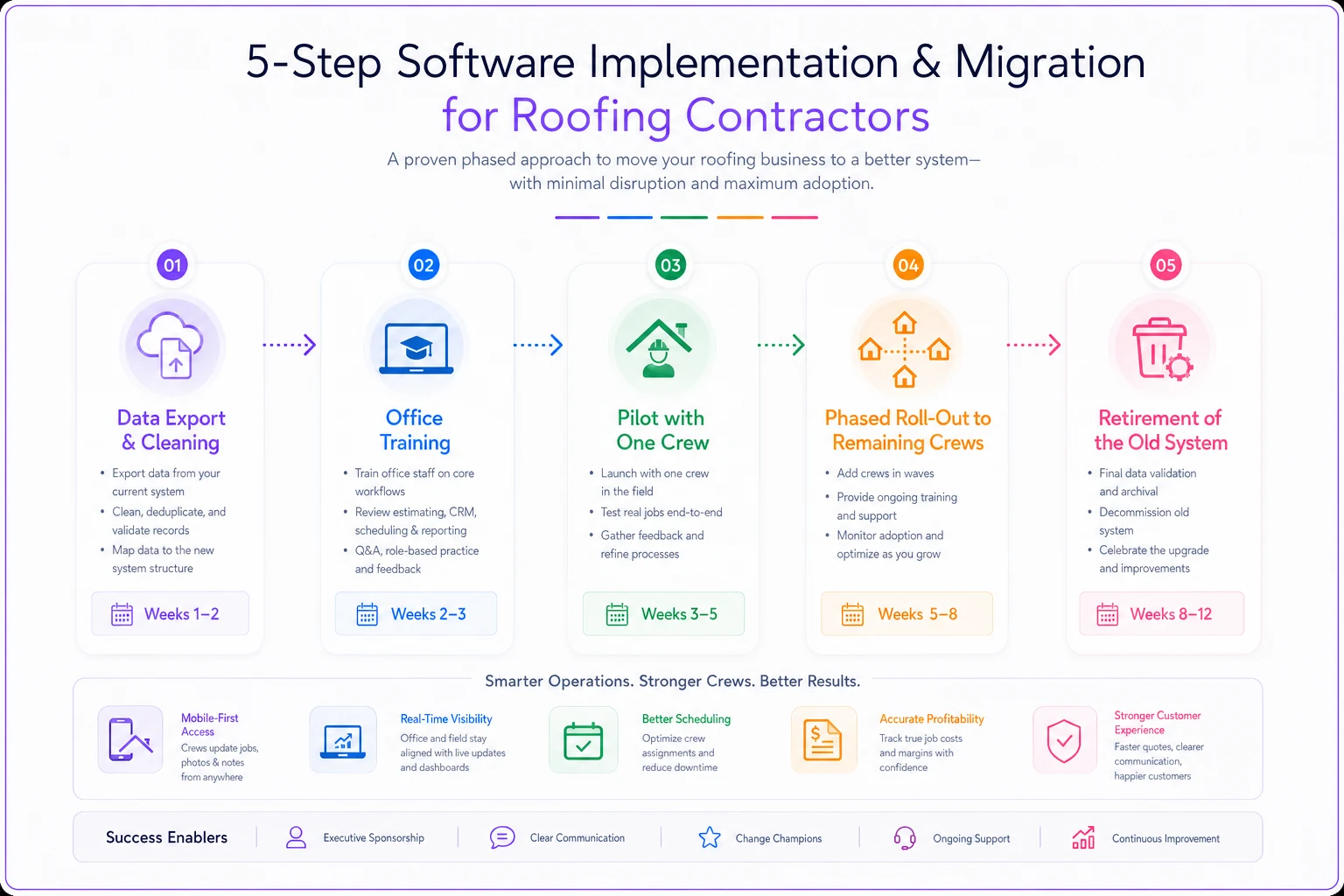
A Realistic Rollout Timeline
-
Weeks 1–2 Data migration and setup. Load your cost data and assemblies. Get accounting sync configured and tested with a few dummy transactions.
-
Weeks 2–3 Office training. Estimators and admin staff learn their daily workflow before crews touch anything.
-
Weeks 3–5 Pilot with one crew. Pick your most adaptable foreman, not your most resistant one. Run real jobs through the full cycle.
-
Weeks 5–8 Fix what broke in the pilot, then roll out to remaining crews in waves.
-
Weeks 8–12 Retire the old system. Don't run both in parallel forever — that's how adoption stalls permanently.
A simple rollout workflow looks like this.
Pilot Program Tips
Run the pilot on complete jobs, estimate through invoice, not just the parts that feel manageable. The handoffs between modules are where software quietly fails, and you only find those gaps on a full cycle. Keep a running list of friction points and bring it to the vendor before full rollout.
The mistake that kills rollouts: letting a few crews opt out "for now." The holdouts become permanent, your data splits across two systems, and your reports become useless because they're missing half the jobs.
ROI Examples: What Payback Actually Looks Like
ROI on roofing software doesn't come from one dramatic savings. It's several modest improvements stacking up.
Example — a mid-size residential roofer, around 7 crews:
Before software, invoices went out an average of six days after job completion because paperwork bounced between the field and office. Software with a tight contract-to-invoice flow cut that to about a day and a half. On annual revenue in the low millions, pulling in receivables that much faster freed up a meaningful chunk of working capital — enough to stop relying on a credit line during the busy stretch.
On the estimating side, tightening labor allowances and tracking estimated-vs-actual cost caught a recurring underbid on steep-pitch jobs. That one correction added a couple of points of margin across maybe a third of their jobs.
Against a software cost of roughly $1,200/month, the faster cash flow and the margin recovery paid it back within the first season. The reporting and reduced double-entry were essentially free gains on top.
The point isn't the exact numbers — it's the shape. Software rarely pays off through one big win. It pays off when faster billing, fewer underbids, and less admin time all move a little in your favor at once.
If crews don't adopt the mobile app, or if you keep estimating in the old spreadsheet "just this once," none of those gains materialize. The ROI lives entirely in actual usage.
When Buying New Software Is a Bad Idea
Not every pain point is a software problem, and new software can make a chaotic operation worse.
Hold off if:
-
Your current process is undefined. Software enforces a workflow; if you don't have one, it'll enforce chaos faster. Fix the process on paper first.
-
You're entering your busiest stretch. Migrating in peak season is how you end up with half-trained crews and lost jobs. Wait for the slow months.
-
Nobody internally will own it. Software without an internal champion dies. If no one on your team will drive adoption, buying it is burning money.
Who should absolutely move forward: shops where the same breakdown keeps happening — late invoices, missed scheduling, estimates that don't match actual costs — despite having a decent process. That's the signal that you've outgrown spreadsheets and texts.
FAQ
Do I need an all-in-one platform, or separate best-in-class tools? Depends on your size and your weakest spot. All-in-one reduces double entry and gives you clean cross-module reporting. Separate tools can be stronger individually but create integration headaches. Smaller shops usually benefit from all-in-one; larger shops sometimes justify the stack.
How long until it actually saves time? Expect a dip first. The first 30–60 days feel slower because people are learning. Real time savings show up around month three, once the workflow is habit.
What's the single most common buying mistake? Choosing on the demo instead of on the full job cycle. The demo shows the highlight reel. The handoffs between estimating, scheduling, field, and invoicing are where things break — and those rarely show up in a 45-minute sales call.
Will my crews actually use it? Only if the mobile app is fast and works offline, and only if you don't let anyone opt out. Field adoption is a leadership decision as much as a software one.
Can I switch later if it doesn't work? Yes, but it's painful. That's why the migration checklist and the scorecard matter — getting it right the first time saves you a second painful migration.
Recommended Next Steps
Start by writing down your top three operational pains in plain language — not "we need software," but "invoices go out a week late" or "we can't tell which jobs lost money." Those pains become your scorecard weights.
Then narrow to three vendors, run the weighted comparison, and insist on seeing a full job cycle in the demo, not just the estimating screen. Test the mobile app on a real phone with a real foreman. Price it for your crew count 18 months out, not today.
And if your most immediate fire is daily scheduling — crews bunched up, routes that don't make sense, mornings spent re-planning the day — work through the rule-based routing and last-minute pivot tactics here before you buy anything. Sometimes a better process solves the problem faster than new software, and you'll walk into the software decision knowing exactly what you need it to do.
Start by writing down your top three operational pains in plain language — not "we need software," but "invoices go out a week late" or "we can't tell which jobs lost money." Those pains become your scorecard weights.
Ready to elevate your roofing operations?
Join hundreds of roofing contractors using Roofyly to streamline workflows, improve crew coordination, and enhance client satisfaction.