



If you've already written down your dispatch rules — zones, buffers, pivot logic, the data you need captured on every job — you're ahead of most roofing operations. The hard part isn't writing the playbook. It's getting your software to enforce it without a dispatcher babysitting every route.
This is the gap most teams hit. The rules live in a dispatcher's head or a shared doc, and the software just stores addresses. Nobody has translated "a tear-off and an inspection shouldn't share a crew after 2pm" into something the system actually checks before auto-assigning.
This article is the translation layer. If you've read the daily dispatch playbook on multi-stop routing templates and pivot tactics, this is the companion piece that shows you exactly which features map to which rules — geofencing, stop priority, time windows, auto-assign logic, role permissions, and the integration points that tie it all together. No product comparisons. Just configuration.
Start with the data model, not the routing screen
Almost everyone starts in the wrong place. They open the routing or dispatch view, start dragging jobs around, and get frustrated that the optimizer makes dumb choices. The optimizer is only as smart as the fields you've defined.
Before you touch a single route, your job records need to carry the data the rules depend on. If your pivot decision tree says "reassign low-priority inspections first," every job needs a priority field the system can actually read. If your buffer rule depends on job type, every job needs a clean job-type field — not freeform text where one estimator types "tearoff" and another types "Tear Off / Full Replace."
| Field | Type | Example values | Why routing needs it |
|---|---|---|---|
job_type | Enum (locked list) | inspection, repair, tearoff, install, punchlist | Drives buffer size and crew eligibility |
priority | Enum | p1emergency, p2scheduled, p3_flexible | Determines pivot/bump order |
service_zone | Enum (geo-derived) | north, central, coastal | Prevents cross-zone routing |
estonsite_minutes | Integer | 45, 180, 420 | Feeds route duration math |
timewindowstart / timewindowend | Timestamp | 08:00 / 12:00 | Hard constraint for arrival |
crewskillrequired | Multi-select | steeppitch, metal, lowslope | Filters auto-assign candidates |
access_constraint | Enum | none, narrowdriveway, permitrequired | Flags jobs that can't share a route block |
buffer_minutes | Integer (auto-filled) | 20, 45 | Explicit gap after this stop |
The single biggest mistake here: letting job_type and priority be optional. If they're optional, half your records won't have them, and your automation rules will silently skip those jobs or dump them into a default bucket. Make them required at creation. A job that can't be classified shouldn't be routable.
One more field people overlook: a geo_locked flag on the address. Satellite estimates and manual entries sometimes drop a pin a quarter mile off. If a job's coordinates haven't been verified, you don't want the optimizer trusting them. A simple boolean that forces human confirmation before the job enters an optimized route saves you from crews driving to the wrong side of a subdivision.
Configuration checklist: what to set up, in order
Work through this top to bottom. Each item depends on the ones above it.
Keep every roofing job on track and on time.
Roofyly helps you manage, schedule, and communicate every roofing project with precision and ease.
- Centralized project planning
- Real-time crew notifications
- Integrated scheduling & client updates
No credit card required
-
- [ ] Lock your enums. Convert
jobtype,priority,servicezone, andcrewskillrequiredfrom free text to fixed picklists. Back-fill existing open jobs. -
- [ ] Define geofences per zone. Draw polygon boundaries, not radius circles — roofing zones follow highways and water, not neat circles.
-
- [ ] Set time-window enforcement to "hard" for p1/p2, "soft" for p3. Hard windows block assignment; soft windows warn but allow.
-
- [ ] Configure default buffers by job type (table below). Store them as a rule, not a manually typed number per job.
-
- [ ] Build the auto-assign eligibility filter. Crew must match skill + zone + availability before the system offers them a job.
-
- [ ] Write the pivot/bump priority order. Define which job classes get reassigned first when something breaks.
-
- [ ] Set role permissions. Decide who can override a hard constraint and who can only request an override.
-
- [ ] Wire integration triggers. Weather, material-ready status, and inspection pass/fail should be able to move a job.
-
- [ ] Stand up a staging environment or test crew. Never test routing logic on live crews.
-
- [ ] Define post-launch KPIs and a dashboard before go-live, not after.
The order matters because buffers reference job types, auto-assign references skills and zones, and pivots reference priority. Build auto-assign before your enums are clean and you'll end up rebuilding it.
Geofencing and zones: polygons over radius
A common failure: someone sets up zones as a 10-mile radius around three office pins. The circles overlap in the middle of town and leave gaps at the edges. Jobs in the overlap get assigned to whichever zone the system checks first — essentially random.
Draw zones as polygons that match how your crews actually drive. A river with two bridges, a highway that takes 25 minutes to cross even though it looks close on a map, a gated community that's technically central but behaves like coastal — these things matter more than straight-line distance.
Then set the rule: a crew's default route stays inside its home zone unless a dispatcher explicitly allows a cross-zone stop. Cross-zone jobs should throw a confirmation, not silently add 40 minutes of windshield time.
Teams that actually enforce this tend to cut a surprising amount of drift — those unplanned "it was on the way" detours that quietly blow up afternoon schedules. It doesn't feel like a big deal until you're looking at a week's worth of drive logs and realize two crews overlapped territory on half the days.
Buffer allocation as a rule, not a guess
Buffers are where routing optimizers and reality diverge. The optimizer assumes a job takes exactly its estimated minutes and that the next stop starts the second the truck arrives. Anyone who's run crews knows that's fiction — ladders, homeowner conversations, a punch-list item that turns into a repair.
Set buffers as a function of job type with a couple of modifiers, and let the system apply them automatically:
| Job type | Base buffer | +Modifier if | Resulting buffer |
|---|---|---|---|
| Inspection | 15 min | steep pitch (+10) | 25 min |
| Repair | 30 min | permit/access flag (+15) | 45 min |
| Tear-off | 45 min | crew < 4 (+20) | 65 min |
| Install | 30 min | first stop of day (+0) | 30 min |
| Punch list | 20 min | — | 20 min |
Here's a ready-to-import buffer rule expressed as logic you can map to most rule engines:
{ "ruleid": "bufferallocationv1", "appliesto": "allstops", "basebufferbytype": { "inspection": 15, "repair": 30, "tearoff": 45, "install": 30, "punchlist": 20 }, "modifiers": [ { "if": "crewskillrequired includes 'steeppitch'", "add": 10 }, { "if": "accessconstraint != 'none'", "add": 15 }, { "if": "crewsize < 4 AND jobtype == 'tearoff'", "add": 20 } ], "writetofield": "bufferminutes" }
Write buffer values back to a visible
buffer_minutesfield on the job so crews and dispatchers can see and question them.
The part most teams miss: the buffer should be written back to a visible field on the job, not hidden inside the optimizer's math. When a buffer lives in a field, your crew and dispatcher can both see it, question it, and adjust the rule when real data proves it wrong. Invisible buffers are impossible to tune.
Multi-stop route template
A route template encodes your standing rules so the dispatcher starts from a sane default instead of a blank map. This isn't the final route — it's the constraint set the optimizer works inside.
{ "templateid": "residentialdailyroutev1", "maxstopspercrew": 5, "maxrouteminutes": 480, "zonelock": true, "orderingrules": [ { "priority": 1, "sort": "timewindowstart ASC" }, { "priority": 2, "sort": "priorityrank ASC" }, { "priority": 3, "sort": "proximitytopreviousstop ASC" } ], "hardconstraints": [ "arrivaltime <= timewindowend", "crewskillrequired subsetof crew.skills", "stop.servicezone == crew.homezone OR overrideapproved == true" ], "softconstraints": [ "minimize totaldriveminutes", "group same accessconstraint stops when possible" ], "applybufferrule": "bufferallocation_v1" }
Notice the ordering logic puts time windows first, priority second, and geographic proximity third. A lot of route optimizers default to pure proximity, which produces tidy-looking maps that miss appointment windows. For roofing, a blown window on a p1 job costs you far more than a few extra miles.
Keep maxstopsper_crew lower than you think — five is already aggressive for anything involving tear-offs or installs. Overloaded routes don't fail at stop one. They fail at stop four, when morning slippage has compounded and the last homeowner gets a "we're running late" call that becomes a callback risk.
Last-minute pivot workflow
Pivots are the real test. A crew texts that a tear-off exposed rot, the job's now a half-day longer, and three downstream stops won't happen. What does the system do?
-
Flag the triggering job as
overrunand recompute its new end time. -
Identify affected downstream stops on that crew's route.
-
Sort affected stops by priority —
p3_flexiblefirst for reassignment or reschedule. -
Search for eligible crews within zone + skill + remaining capacity.
-
Offer reassignment to the best-match crew (least added drive time, window still satisfiable).
-
If no crew fits, auto-draft a reschedule message and queue it for dispatcher approval.
-
Log the pivot with reason code so you can audit which job types cause the most disruption.
As a webhook rule triggered by a crew status update:
{ "trigger": "job.status == 'overrun'", "actions": [ { "step": "recomputeroute", "crewid": "{{job.assignedcrew}}", "fromstop": "{{job.stopindex}}" }, { "step": "collectdownstream", "filter": "stopindex > {{job.stopindex}}", "output": "affectedstops" }, { "step": "rankforpivot", "sort": "priorityrank DESC", "input": "affectedstops" }, { "step": "findreassignment", "constraints": [ "candidate.homezone == stop.servicezone", "candidate.skills supersetof stop.crewskillrequired", "candidate.remainingminutes >= stop.estonsiteminutes + stop.bufferminutes" ] }, { "step": "ifnocandidate", "do": "draftreschedule", "requireapproval": true } ] }
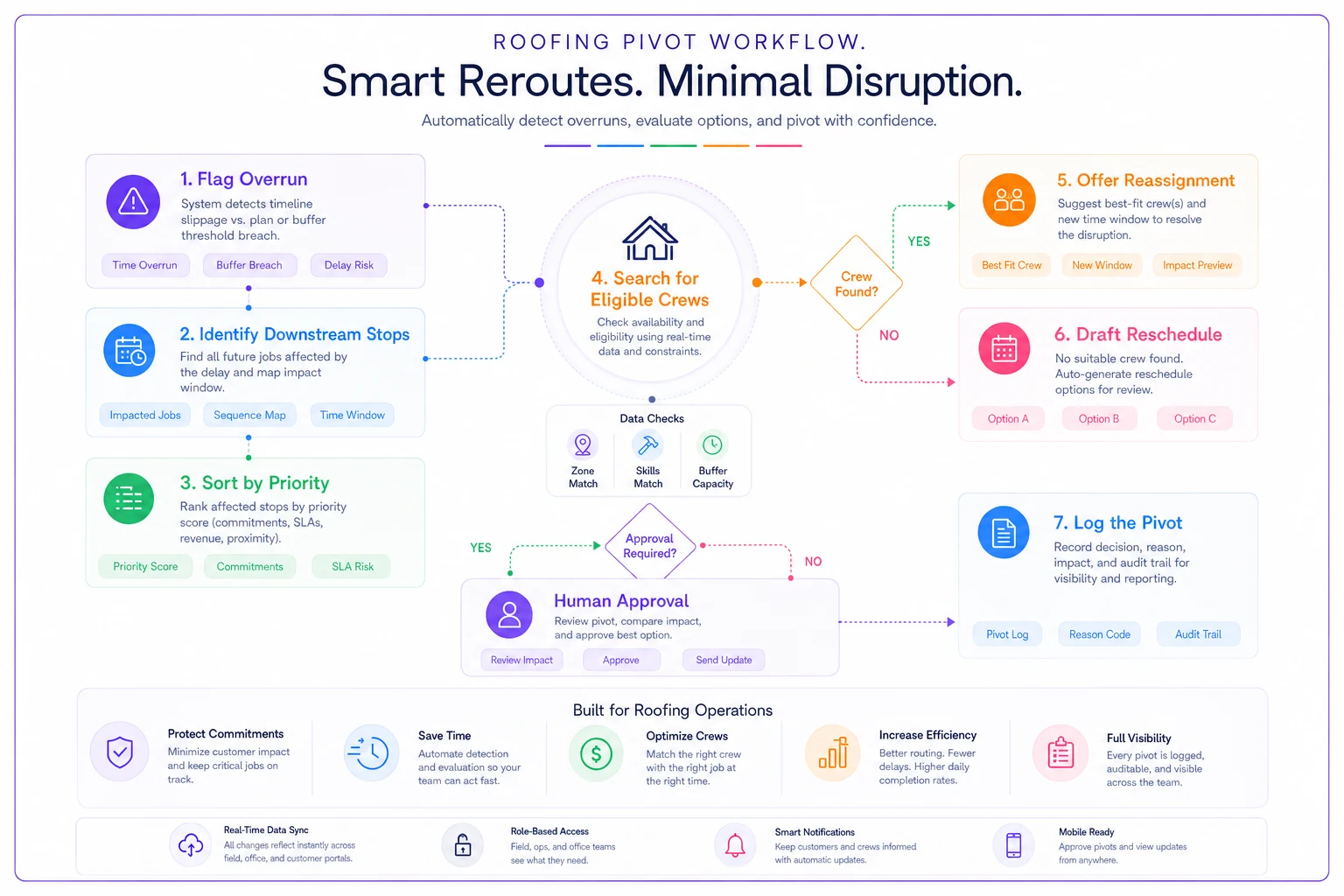
Worth calling out explicitly: never let the system silently reschedule a customer without a human approving the message. Auto-reassignment between crews is fine. Auto-texting a homeowner "we're not coming today" with zero oversight is how you generate angry reviews. Draft it, queue it, let a person hit send.
The reason code on step 7 pays off over a full season. When you review logs and see tear-offs triggering 60–70% of your pivots, you know your tear-off buffers are too thin — and you fix the rule instead of fighting the same symptom every week.
Auto-assign rules and role permissions
Auto-assign is where teams either save hours or create chaos. The dividing line is the eligibility filter. A crew should only be offered a job if they clear every hard constraint. If your filter is loose, the system assigns a metal install to a crew that's never touched standing seam, and you find out at 7am.
{ "autoassignfilter": { "requireall": [ "crew.skills supersetof job.crewskillrequired", "crew.homezone == job.servicezone", "crew.availableminutes >= job.estonsiteminutes + job.bufferminutes", "job.geolocked == true" ], "tiebreakers": [ "minimize addeddriveminutes", "balance weeklyloadacrosscrews" ] } }
-
- Dispatcher — build routes, approve cross-zone stops, approve reschedule messages, override soft constraints.
-
- Ops manager — override hard constraints (skill mismatch, blown window), edit buffer rules, change zone boundaries.
-
- Foreman/crew — update job status, flag overruns, add on-site notes; cannot reorder their own route or reassign jobs.
-
- Estimator/sales — create jobs, set job type and initial window; cannot assign crews.
The mistake to avoid: giving everyone override power "to keep things moving." Once three people can override hard constraints, the constraints mean nothing and you're back to tribal-knowledge dispatch. Keep hard-constraint overrides narrow and logged.
Integration points that should move a job
Routing isn't a closed system. Three external signals should be wired to trigger rule evaluation:
-
- Weather confidence — when a forecast provider drops install-day confidence below your threshold, flag affected installs for review before the day fills up.
-
- Material-ready status — a job shouldn't enter an install route until materials are confirmed on site or staged. Tie route eligibility to a
materials_ready == truefield fed from your supplier or warehouse check-in. -
- Inspection pass/fail — a failed inspection should auto-generate a punch-list job and re-insert it into the appropriate crew's zone queue, not sit in someone's email.
The common breakdown: these signals exist somewhere — a weather app, a text from the yard, a note in the inspection record — but none of them touch the routing system. The information arrives and dies in a silo. Wiring even one of these three integrations removes a whole category of wasted truck rolls. Material-ready is usually the highest-impact one to start with.
Testing and validation before you go live
Don't flip this on for live crews Monday morning. Routing bugs don't show up in the demo — they show up at stop four on a busy Thursday.
A practical validation sequence:
-
Replay last week. Load last week's actual jobs into staging and run them through your templates. Does the system produce routes a seasoned dispatcher would accept? Where it disagrees, figure out whether the rule is wrong or the dispatcher was improvising.
-
Break it on purpose. Inject an overrun on a mid-route tear-off and confirm the pivot workflow fires, ranks correctly, and stops short of auto-messaging.
-
Test the edges. A job with a missing
job_type. A cross-zone p1. A crew with no matching skill. The system should refuse or flag, never guess. -
Shadow-run for a week. Let the system build routes while your dispatcher builds theirs manually. Compare. Measure the gaps.
-
Then cut over, keeping the manual process as a fallback for two more weeks.
Teams that skip the replay step almost always discover their buffer rules are tuned for ideal days and fall apart the first time weather or an overrun enters the picture.
A realistic before/after
A mid-size residential contractor running four crews across a metro area was dispatching from a whiteboard and a spreadsheet. Their dispatcher spent roughly the first 90 minutes of every morning rebuilding routes by hand, and cross-zone drift was eating somewhere around 5–7 hours of crew drive time a week.
After mapping their written rules into templates — locked job types, polygon zones, buffer rules by type, and the pivot workflow above — morning routing shrank to about 20–25 minutes of review-and-approve instead of build-from-scratch. The bigger win was fewer blown time windows: missed-appointment callbacks dropped noticeably in the first quarter, and the dispatcher stopped being the single point of failure when they took a day off.
Nothing was dramatic overnight. The buffer rules needed two rounds of tuning once the reason-code logs showed tear-offs overrunning more than expected. But by the end of the season, the routing ran on rules the whole team could see and question — instead of one person's memory.
KPIs to monitor post-launch
Stand these up on a dashboard before go-live so you have a baseline:
-
- On-time arrival rate (arrived within time window) — target trend upward week over week.
-
- Blown-window count by priority — p1/p2 blows should approach zero.
-
- Pivot frequency and reason codes — tells you which job types need buffer tuning.
-
- Cross-zone stop count — should stay low; a spike means your zones need redrawing.
-
- Average daily drive minutes per crew — watch for creep.
-
- Auto-assign acceptance rate — how often the system's first pick is kept without override. Low acceptance means your eligibility filter or buffers are off.
-
- Morning routing time — the dispatcher-hours metric that justifies the whole project.
Watch the reason codes and the auto-assign acceptance rate most closely in the first month. Together they tell you whether your rules match reality or whether you encoded wishful thinking.
When this is worth it — and when it isn't
Rule-based routing pays off when you're running three or more crews across distinct zones with a real mix of job types. The coordination cost at that scale is where encoded rules beat human memory every time.
For a single crew doing one or two jobs a day in a tight radius, it's overkill. A spreadsheet is fine there, and forcing rigid rules onto a small operation just adds friction without much upside.
It's also worth being honest: this is a bad idea to attempt before your data is clean. If job_type is freeform text and half your addresses aren't geo-verified, automation will faithfully execute your mess at scale. Fix the data model first. The routing logic is the easy part once the fields underneath it are honest.
The whole point isn't to replace your dispatcher's judgment — it's to get the repetitive constraint-checking out of their head and into the system, so their judgment goes toward the genuinely hard calls. Map the rules carefully, test them against real weeks, tune them with the reason-code data, and the morning scramble stops being the thing your whole operation balances on.
Ready to elevate your roofing operations?
Join hundreds of roofing contractors using Roofyly to streamline workflows, improve crew coordination, and enhance client satisfaction.